Understanding Free vs. Paid File Transfer Options with GoodSend
Introduction to Large File Transfers
Sending large files can be challenging. Email attachments typically have size limits (often around 25MB), making it difficult to share larger files like high-resolution videos, design files, or comprehensive business documents.
Google's own documentation puts Gmail's ceiling at 25MB per message, and anything larger is quietly stripped out and replaced with a Google Drive link. Outlook.com sits at the same 25MB for file attachments, swapping to OneDrive links above that. So the moment your folder of raw photos or a single client video crosses that line, you're already looking for a transfer service — which is where the "free large file transfer" search usually begins.
The good news: genuinely free options exist, and some of them are more generous than you'd expect. The catch is that "free" is priced somewhere else — in expiry windows, monthly caps, ads, licence terms, and in never knowing whether your file actually arrived.
How Much Can You Send for Free? The Real Ceilings
Free tiers are not interchangeable. One of them will send 50GB without an account; another stops at 2GB. Here's where each one actually caps out.
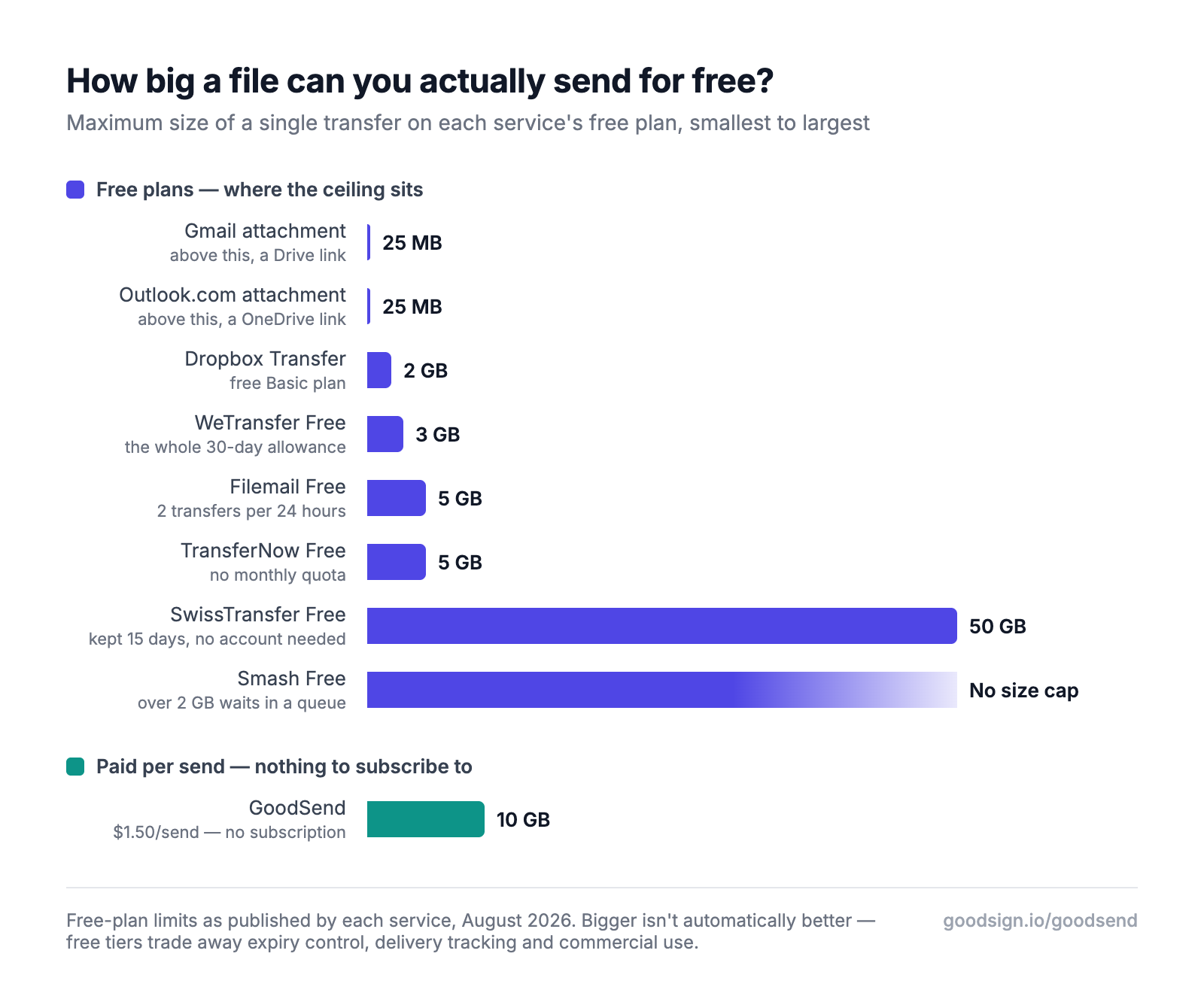
Two things jump out. First, email is not in the same conversation — 25MB is a rounding error next to a 5GB transfer. Second, the free tier that sends the most is not the famous one: SwissTransfer will move 50GB for free, with no account, while WeTransfer Free tops out at 3GB.
But per-transfer size is only one dimension, and it's the one free services advertise hardest. The limits that actually bite are the ones further down the page.
Free Large File Transfer Options: Limitations
Many free file transfer services exist, but they come with significant limitations:
| Free Service Limitations | What that looks like in practice |
|---|---|
| Transfer size caps | Dropbox Transfer's free Basic plan stops at 2GB per transfer |
| Monthly send caps | WeTransfer Free allows 10 transfers or 3GB total per rolling 30 days — whichever runs out first |
| Daily send caps | Filemail's free plan allows just 2 transfers in any 24-hour period |
| Short expiration periods | WeTransfer Free links expire after a maximum of 3 days; Filemail Free keeps files 7 days |
| Queues on big transfers | Smash's free plan has no stated size limit, but anything over 2GB loses priority and waits in a queue |
| Advertising exposure | WeTransfer shows ads on download pages — on the free plan and on the paid Starter plan |
| Commercial use restricted | WeTransfer Free is licensed for individual, non-commercial use only — client work is outside the terms |
| Limited tracking capabilities | Free tiers rarely tell you whether the recipient opened the link or downloaded anything |
The free tiers quietly got smaller. Until December 2024, WeTransfer's free plan sent 2GB per transfer with no monthly limit and kept links alive for a week. In its late-2024 overhaul the per-transfer figure went up to 3GB — but 3GB became the entire 30-day allowance, capped at 10 transfers, with links expiring after 3 days. The headline number improved while the amount you can actually send in a month fell. Pro and Premium were retired in the same round. If you remember free file transfer being easier a couple of years ago, you're not imagining it.
What "Free" Actually Costs You
The bill arrives later, not never. A free transfer that expires in 3 days is a transfer you re-upload when your client comes back from a long weekend. A download page wrapped in advertising is your client's first impression of your work. And a link with no tracking means the "did you get it?" email, the follow-up, and the uncertainty about whether the deal is stalled or the file simply never landed. None of that shows up on an invoice — it shows up in your week.
The tracking gap is the one people underestimate. Free services hand you a link and stop there; whether it was opened, by whom, and whether the files were ever downloaded is invisible.
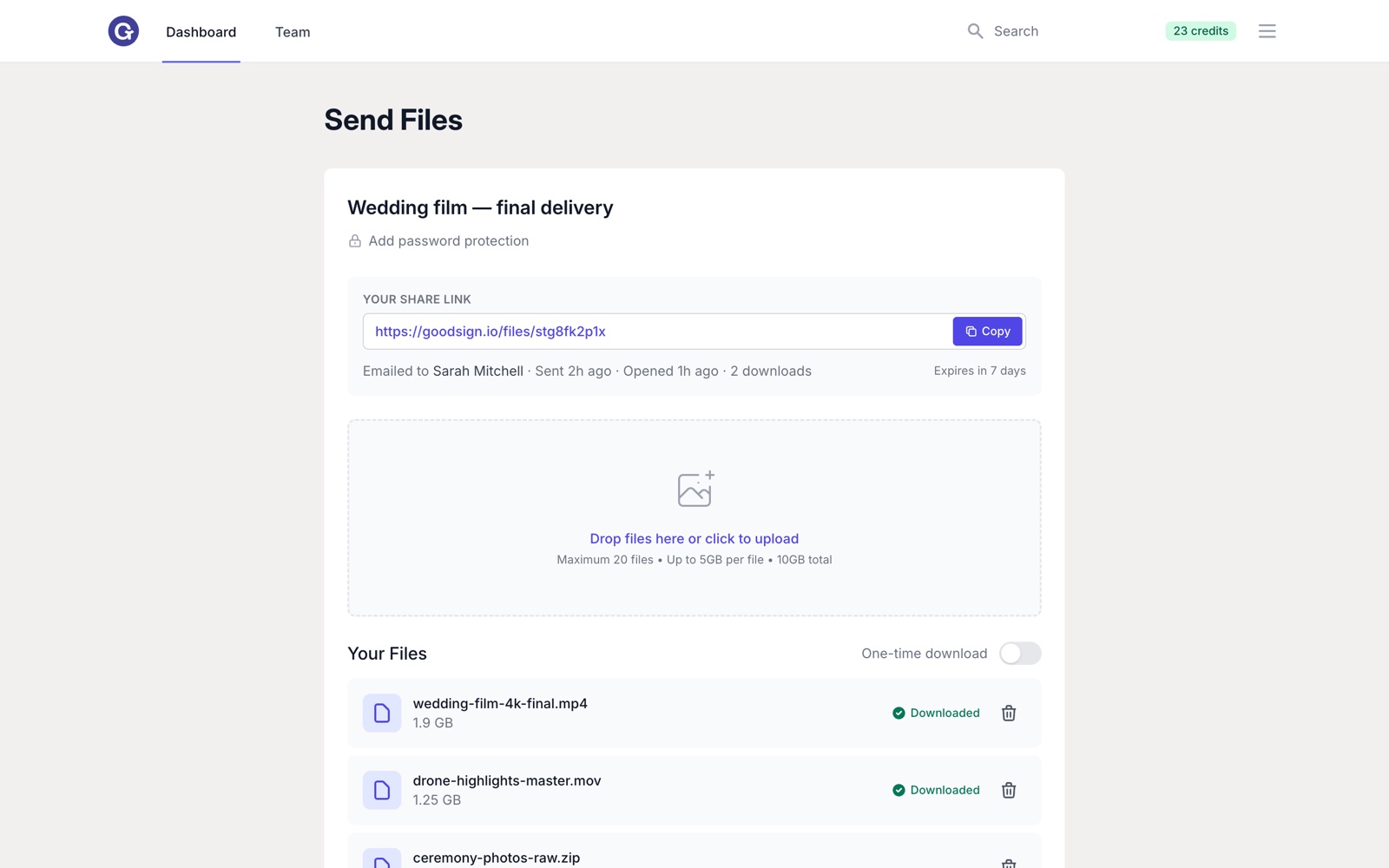
Knowing a file was downloaded at 9:14am is the difference between chasing a client and moving on to the next job.
Should You Just Zip It First?
A common workaround is to compress everything and squeeze under a free tier's cap. Sometimes that works. Often it doesn't — because the files that are actually large are usually already compressed.
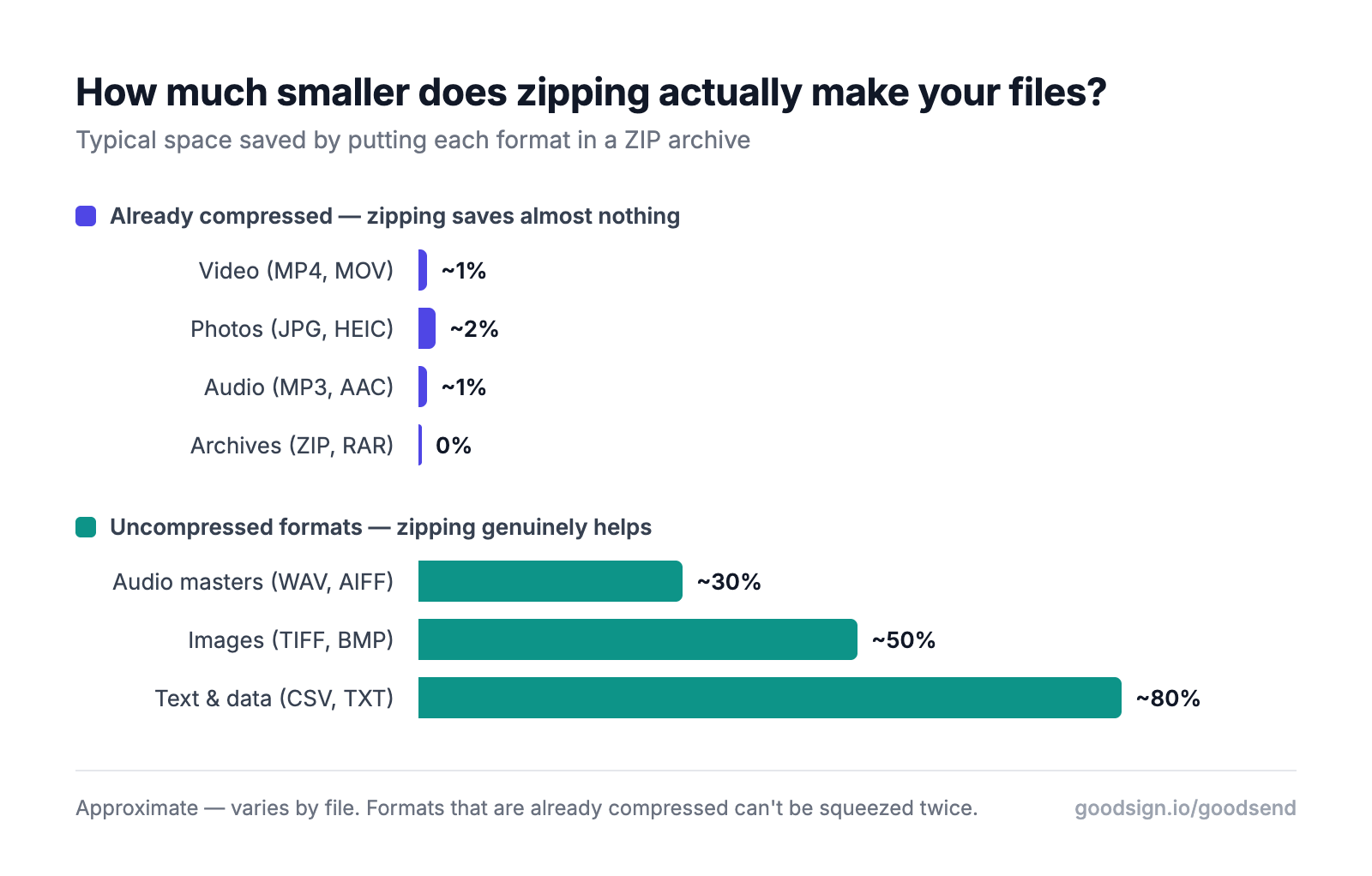
Zipping a folder of WAV masters, TIFFs or CSV exports genuinely helps. Zipping MP4s, JPEGs and MP3s buys you a percent or two — you'll spend twenty minutes compressing and still be over the limit. There's more detail on that in our guide to sending large files without compressing them.
Why GoodSend Offers a Better Value
GoodSend is not free, and we're not going to pretend otherwise. It costs $1.50 USD per send. The argument isn't that it beats free — it's that when free runs out, one send at $1.50 beats signing up for a monthly subscription you'll use four times a year.
Security & Reliability
- Complete encryption of all file transfers
- Guaranteed delivery with tracking and notifications
- No file corruption risks often associated with free services
Professional Experience
- Ad-free experience for both senders and recipients
- Branded, professional interface that reflects well on your business
- Tracking and notifications for file delivery, opens, and downloads
Cost-Effective Approach
- No subscription required - pay only when you use the service
- Credits system makes it easy to manage expenses ($1.50 per send)
- Minimum purchase of 10 credits provides flexibility for occasional use
Credits don't expire, so a month where you send nothing costs nothing. That's the whole pitch against a subscription: WeTransfer's uncapped Ultimate plan runs about US$228 a year whether you send 200 transfers or none. We've broken that maths down in detail in our WeTransfer pricing guide.
How GoodSend Works
- Purchase credits through our secure Stripe payment portal using any major credit card
- Upload your files (up to 20 files, 5GB per file, 10GB total) using our drag-and-drop interface
- Enter recipient details including name and email address
- Send your files with optional message
- Track delivery - know when emails are opened and files are downloaded
- Files remain available for 7 days before automatic expiration
Your recipient needs nothing — no account, no app, no sign-up. They click the link and the files download in the browser.
When to Choose GoodSend Over Free Options
GoodSend is ideal when:
- You need to send files up to 10GB in total size
- Professional presentation matters to your clients or colleagues
- You require delivery confirmation and tracking
- Security and encryption are essential for your data
- You need reliable delivery without file corruption
- You want to avoid the hassle of free service limitations
- You've hit a monthly or daily cap mid-project and can't wait for it to roll over
- You're sending client work, where a free plan's non-commercial licence doesn't apply
When free is genuinely the right answer. Sending your holiday photos to family? Use a free tier — SwissTransfer will move 50GB of them without an account. Sending one small file to a colleague who's sitting next to you? Email it. Free tools are fine for personal, low-stakes, one-off transfers, and we'd rather say so than pretend otherwise. The case for paying starts when the transfer is work: when it's a client deliverable, when you need to know it arrived, when a dead link on day four costs you a day, or when you're sending often enough that the caps have started shaping your week.
GoodSend Pricing Transparency
Unlike free services that may upsell or surprise you with limitations, GoodSend offers straightforward pricing:
- $1.50 per file send (1 credit)
- Minimum purchase: 10 credits ($15)
- No monthly fees or subscriptions
- No hidden charges or upsells
The same credits also cover GoodSign document signing, so nothing sits unused. If you'd rather compare the whole field before deciding, we've reviewed the top alternatives to WeTransfer for sending huge files, free options included.
Quick Tips
- Batch your files when possible to maximize the value of each credit
- Check file sizes before sending to ensure they're under the 10GB combined limit
- Notify recipients that they'll be receiving a GoodSend link to set expectations
- Purchase credits in advance if you anticipate multiple sends
- Monitor tracking information to confirm recipients have downloaded your files
- Remember the 7-day expiration and alert recipients if time-sensitive
- Use GoodSend for client deliverables to present a more professional image than free alternatives
Frequently Asked Questions
Is there a truly free way to send 10GB?
Yes. SwissTransfer's free service sends up to 50GB per transfer with no account required, and keeps files for 15 days (extendable to 30 on request). Smash's free plan states no size limit at all, though transfers over 2GB lose priority and sit in a queue before they send. Both are legitimate free options for a large one-off transfer. What you don't get on either is delivery and download tracking, one-time links, or a service you're a paying customer of when something goes wrong.
Do free file transfer links expire?
All of them expire, and the windows are shorter than most people expect. WeTransfer Free links last a maximum of 3 days. Filemail's free plan keeps files for 7 days. SwissTransfer holds files for 15 days and offers the sender a one-time extension to 30. GoodSend links last 7 days, after which the files are permanently deleted. Expiry is a feature, not an oversight — but it means the clock starts the moment you hit send, not the moment your recipient gets around to reading their email.
Can I just email the file instead?
Only if it's small. Gmail caps a message at 25MB and automatically converts anything larger into a Google Drive link. Outlook.com applies the same 25MB limit to file attachments and switches to OneDrive above it. Both of those fallbacks share a file out of your cloud storage, which means the file stays live in your account until you remember to unshare it — the opposite of a transfer link that expires on its own.
Is GoodSend free?
No. GoodSend costs $1.50 USD per send, bought as credits with a minimum purchase of 10. There's no free sending tier and no trial credits, and we'd rather be straight about that than have you find out at checkout. What there isn't is a subscription: no monthly fee, no annual commitment, and credits that never expire. If you send files a couple of times a month, that's a few dollars a year against roughly US$228 for an uncapped WeTransfer Ultimate plan.
What's the largest file GoodSend can send?
5GB for any individual file, 10GB in total across up to 20 files in a single send. That covers presentations, video files, design packages, photo sets and document archives. If you routinely move raw video archives measured in hundreds of gigabytes, a service built for that — or a free tier like SwissTransfer's 50GB — is the more honest recommendation.
Visit https://goodsign.io/goodsend to start sending files securely today.
Free-plan limits cited above are as published by each service in August 2026, sourced from their own documentation. Providers change these — WeTransfer's December 2024 overhaul is proof — so check the current terms before you rely on a number.