Top 5 Alternatives to WeTransfer for Sending Huge Files
Say Goodbye to Subscription Fees with Pay-Per-Use File Sharing
Tired of paying monthly subscriptions for file transfer services you only use occasionally? Need to send massive files without the hassle of complicated platforms? The days of overpaying for file sharing are over.
GoodSend leads our list of WeTransfer alternatives, offering secure file transfers at just $1.50 per send with no subscription required.
Every plan, cap and limit below was re-checked in August 2026 — because most of them changed in the last two years, and several of the "alternatives" people still recommend online no longer exist. Here's how the live options actually compare:
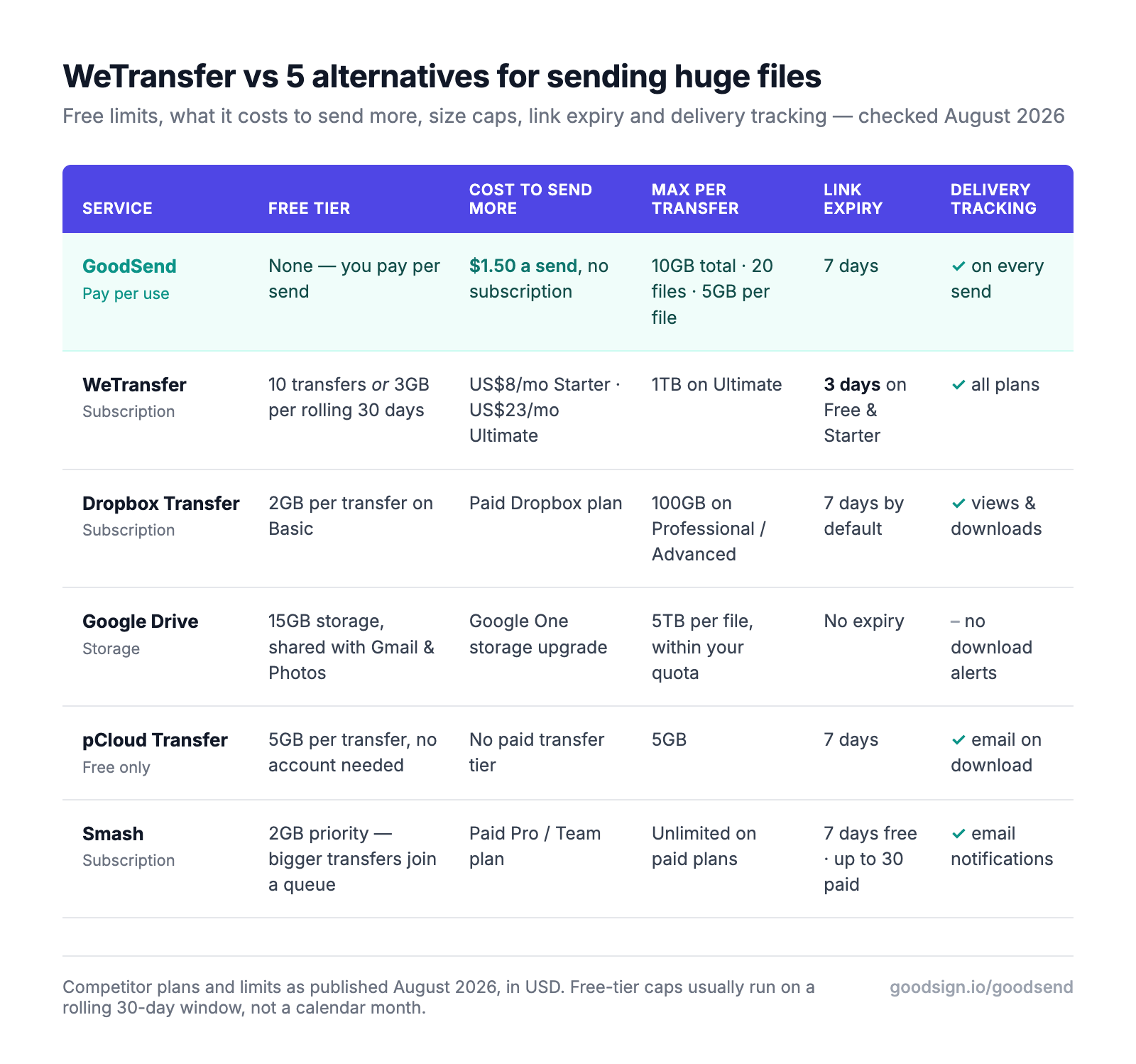
WeTransfer's free tier isn't the one you remember. Since the late-2024 plan overhaul, free accounts get 10 transfers or 3GB in any rolling 30-day window, and links die after 3 days. The rolling window is the sting — your allowance doesn't reset on the 1st, it trickles back one send at a time. Full breakdown in our WeTransfer pricing guide.
1. GoodSend - The Ultimate Pay-As-You-Go File Transfer Solution
GoodSend revolutionizes large file sharing with its straightforward approach: pay only when you send, not every month regardless of usage. At just $1.50 per transfer, it's the most cost-effective solution for businesses and professionals who send large files occasionally.
Why GoodSend tops our list:
- No subscription traps - pay only $1.50 per send
- Bank-level security with end-to-end encryption
- Send up to 10GB (20 files max, up to 5GB each)
- User-friendly interface for both senders and recipients
- Automatic 7-day expiration for enhanced security
- Delivery tracking and notifications included
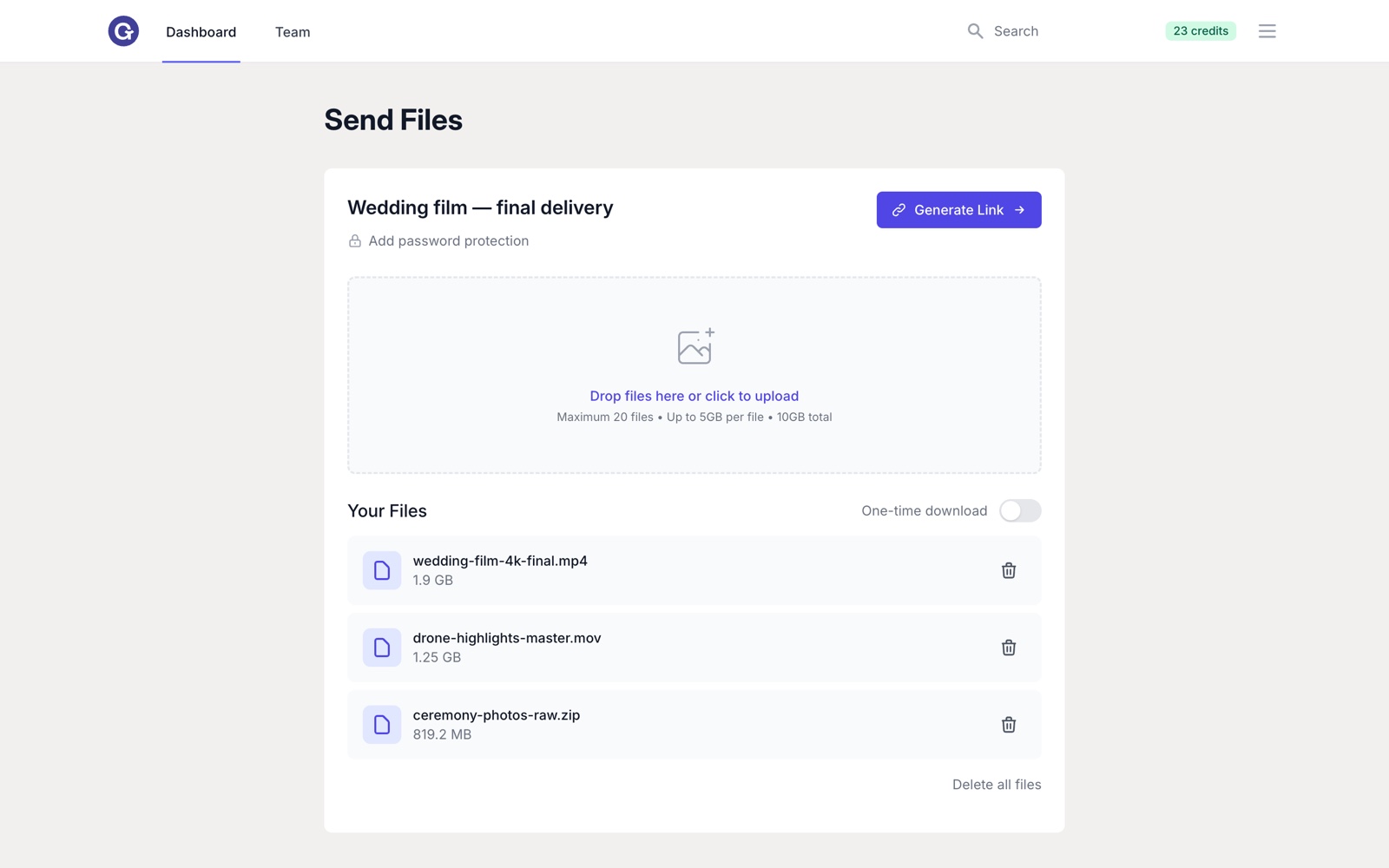
In practice it's a single screen: drag the files in, add the recipient's email, send. Recipients don't need an account, an app, or a login — they click the link in their inbox and the download starts. And because 7 days is more than double WeTransfer's 3-day maximum on its free and Starter plans, your client has a working weekend to get to it.
From the creators of one of the market's most popular eSignature solutions, GoodSend applies the same successful pay-per-use model that made GoodSign a trusted name in digital document handling. The same credits also cover document signing, so one small credit pack covers both jobs.
2. Dropbox Transfer
Dropbox Transfer lets Basic (free) users send up to 2GB per transfer, with larger transfers unlocked by paid Dropbox plans — up to 50GB on Plus and 100GB on Professional and Advanced. Transfers expire after 7 days by default, and higher tiers can extend that. It's genuinely good if you're already paying for Dropbox storage; the catch is that you're buying a whole cloud storage subscription to get a transfer feature, and the transfer limit you get is decided by the storage tier you happen to be on.
3. Google Drive
Google Drive offers 15GB of free storage with sharing capabilities, and individual files can be enormous — up to 5TB each — provided they fit inside your quota. Two things make it an awkward fit for sending huge files, though. First, that 15GB is shared across Gmail, Drive and Google Photos, so a few big video files can fill it and take your inbox down with it — Gmail stops sending and receiving once you're over. Second, there's no delivery confirmation: Drive won't tell you when someone downloads what you shared, so you're back to sending "did you get it?" emails.
4. pCloud Transfer
pCloud Transfer offers free transfers up to 5GB with a 7-day expiration, to as many as 10 recipients, with optional password protection and no account required at either end. It's the most generous genuinely free option on this list, and it emails you when the recipient starts downloading. The limitation is that there's nowhere to go from there: there is no paid tier for Transfer, so 5GB and 7 days is the ceiling, permanently. If your files outgrow it, you're switching services rather than upgrading.
5. Smash
Smash is the option to look at when the file is genuinely enormous. Its free tier prioritises transfers up to 2GB; anything bigger still sends, but joins a queue behind paying customers, which can mean a long wait. Paid Pro and Team plans lift the size ceiling entirely and extend availability from 7 days to 30. Transfers are AES-encrypted and you get email notifications through the sending and downloading process. If you're shipping a 60GB video project once, Smash's paid tier does something GoodSend doesn't.
What happened to Firefox Send?
If you landed here looking for Firefox Send, the honest answer is that it's gone. Mozilla suspended the service in mid-2020 after malware operators abused it to distribute ransomware and phishing payloads, then discontinued it permanently in September 2020. Plenty of "best WeTransfer alternatives" lists still recommend it — a decent signal of how carefully those lists were checked. For the privacy-minded, the closest live equivalents are encrypted transfer services like Smash or GoodSend, both of which encrypt files in transit and at rest and delete them automatically when the link expires.
Pricing Comparison: Subscription vs. Pay-Per-Use
| Service | Pricing Model | Cost for Occasional Use | Max Per Transfer | Link Expiry |
|---|---|---|---|---|
| GoodSend | Pay-per-use | $1.50 per send, $0 in months you send nothing | 10GB total, 20 files, 5GB per file | 7 days |
| WeTransfer | Free tier + subscription | Free (10 sends or 3GB per 30 days), or US$8/mo Starter, US$23/mo Ultimate | 1TB on Ultimate | 3 days on Free and Starter |
| Dropbox Transfer | Free tier + subscription | 2GB free on Basic; larger transfers need a paid Dropbox plan | 100GB on Professional/Advanced | 7 days by default |
| Google Drive | Free storage + upgrades | Free to 15GB, shared with Gmail and Photos | 5TB per file, within quota | No expiry |
| pCloud Transfer | Free only | Free | 5GB | 7 days |
| Smash | Free tier + subscription | Free under 2GB priority; bigger transfers queue behind paid users | Unlimited on paid plans | 7 days free, up to 30 paid |
Competitor pricing and limits as published in August 2026, in USD. We've made our best effort to check every figure here; if something has changed since, tell us and we'll fix it.
Why Traditional File Sharing Services Fall Short
Most file sharing platforms force you into subscription models, charging monthly fees whether you use their service once or fifty times. For occasional large file transfers, this means:
- Overpaying for unused capacity
- Managing recurring subscriptions you rarely need
- Dealing with free-tier limitations that restrict file sizes and features
The third one is the modern trap. Free tiers used to be a generous on-ramp; now they're a countdown. WeTransfer's free plan is also, per its own terms, for individual non-commercial use — so the freelancer sending a client a video is already outside the lines.
What a year actually costs
Say you send four transfers a month — a fairly typical freelancer or small-firm rhythm:
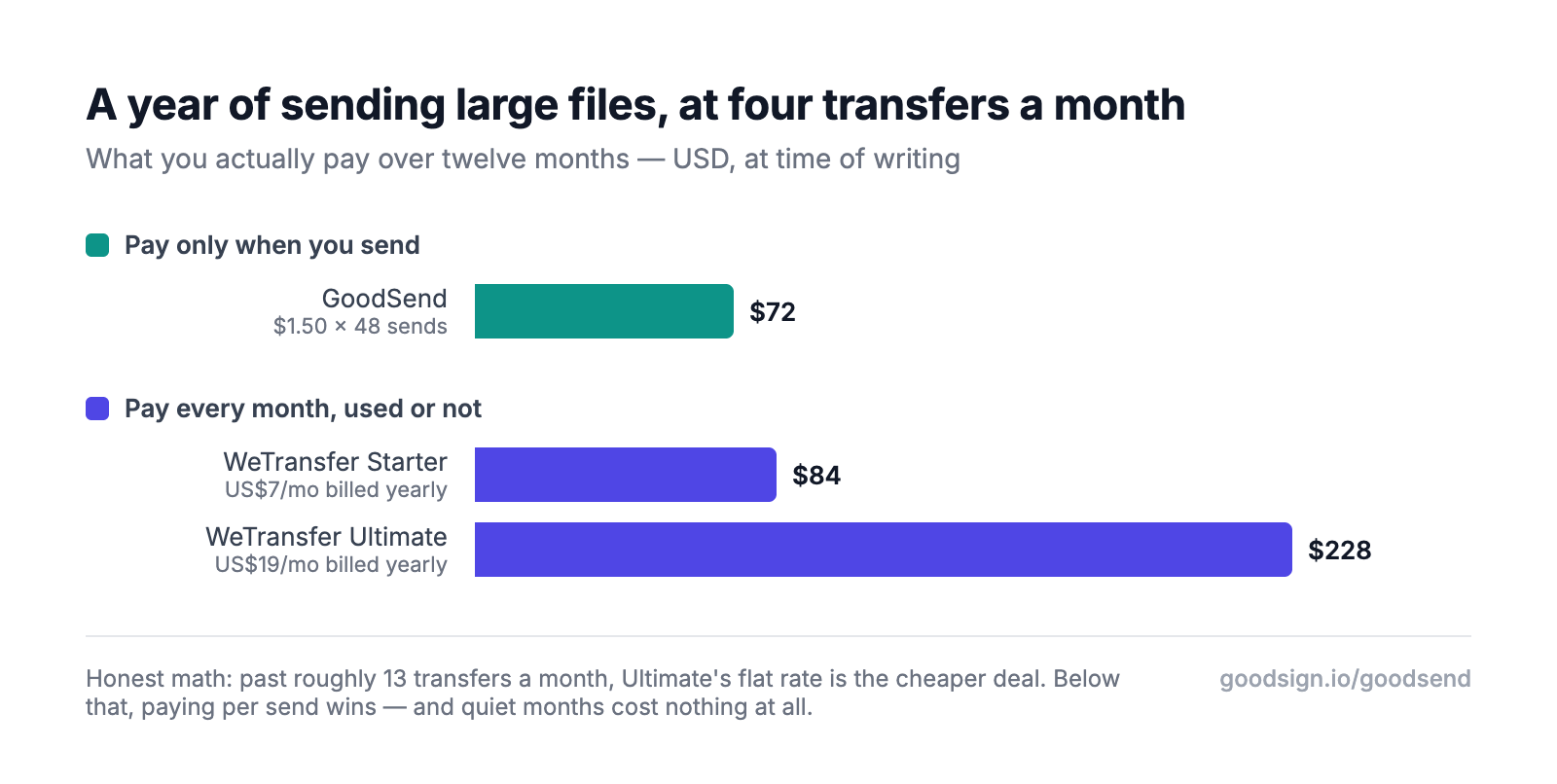
Where the line actually falls: about 13 sends a month. Below that, paying $1.50 a send is cheaper than WeTransfer Ultimate's US$228 a year. Above it, the flat subscription genuinely wins and we'd tell you to take it. Most people we talk to are nowhere near 13 — they send in bursts, then go quiet for a month, and pay for the quiet months anyway.
Should You Zip Your Files First?
It's the reflex when a transfer is too big: select everything, compress, hope it squeezes under the limit. For the files most people are actually trying to send — video, photos, audio — it doesn't work, because those formats are already compressed. Zipping an MP4 typically saves around 1%.
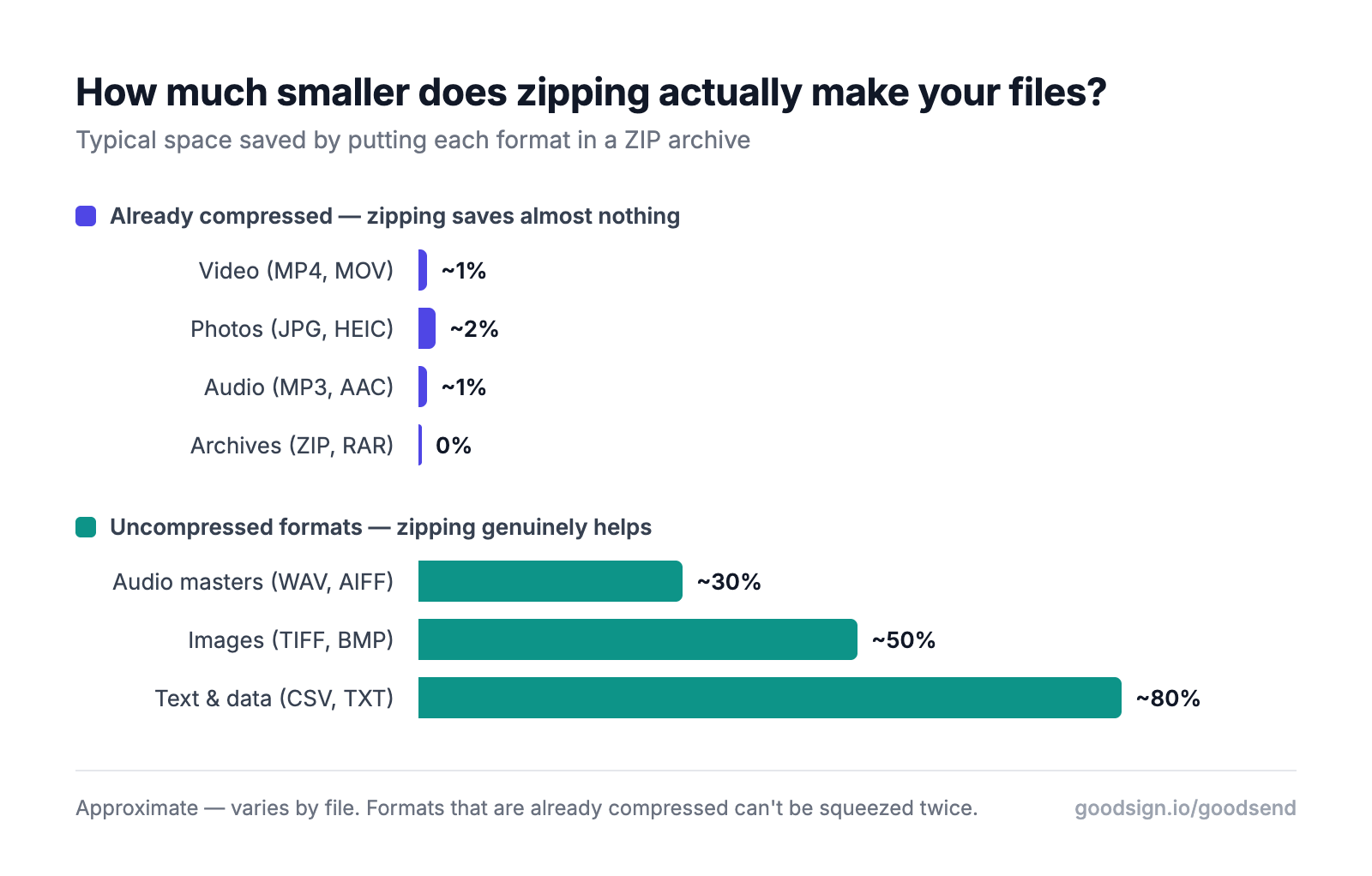
Zipping earns its keep on uncompressed formats — WAV masters, TIFFs, CSVs and text — where savings run from 30% to 80%. Everywhere else you've spent twenty minutes to shave a rounding error, and handed your recipient an archive they have to unpack. The better answer is a service whose limits fit the files, which is what our guide to sending large files without compressing them covers in detail. If cost is the pressing issue, we've also rounded up the free large file transfer options and where each one runs out.
The GoodSend Advantage for Businesses
GoodSend is specifically designed for businesses and professionals who:
- Need to send large files occasionally
- Want enterprise-grade security without enterprise-grade prices
- Prefer simple, transparent pricing without commitments
- Require professional tracking and delivery confirmation
Created by GoodSign, pioneers of the pay-per-use model in eSignatures, GoodSend applies the same customer-friendly approach to file transfers.
Common Questions
What is the best free alternative to WeTransfer? pCloud Transfer, if 5GB is enough — it's free, needs no account at either end, keeps links live for 7 days and emails you when the download starts. There's no paid tier to grow into, so it's a ceiling rather than a starting point.
Is there a WeTransfer alternative with no subscription? Yes. GoodSend charges $1.50 per send with no monthly fee at all — you buy credits, they never expire, and a month where you send nothing costs nothing.
How big a file can I send without paying? 5GB with pCloud Transfer, 2GB per transfer with Dropbox Transfer's free Basic plan, and 2GB with Smash before your transfer joins the queue. WeTransfer's free plan caps you at 3GB of total volume across a rolling 30 days, not per transfer.
Why did WeTransfer get more expensive? The 2024 plan overhaul retired Pro and Premium and folded their features into Ultimate at US$23/month. The new entry-level paid plan, Starter at US$8/month, keeps the free plan's 10-transfer cap and 3-day expiry — so paying doesn't lift the limits most people hit.
Stop paying monthly for services you use occasionally. Send your next large file for just $1.50 with GoodSend — no subscription, no caps, and credits that never expire.
Need to send large files? Try GoodSend — up to 10GB, no account needed.