A one-time download link — also called a single-use download link — works exactly once. Your recipient downloads the file, it locks behind them, and a forwarded copy is useless. Here's how they work, how to send one in under a minute, and when a normal share link isn't safe enough.
$1.50 per send · no subscription · recipients need no account
The answer you searched for
Every download link is a URL pointing at a file. The difference is what happens after the first download — and that difference is the whole security model.
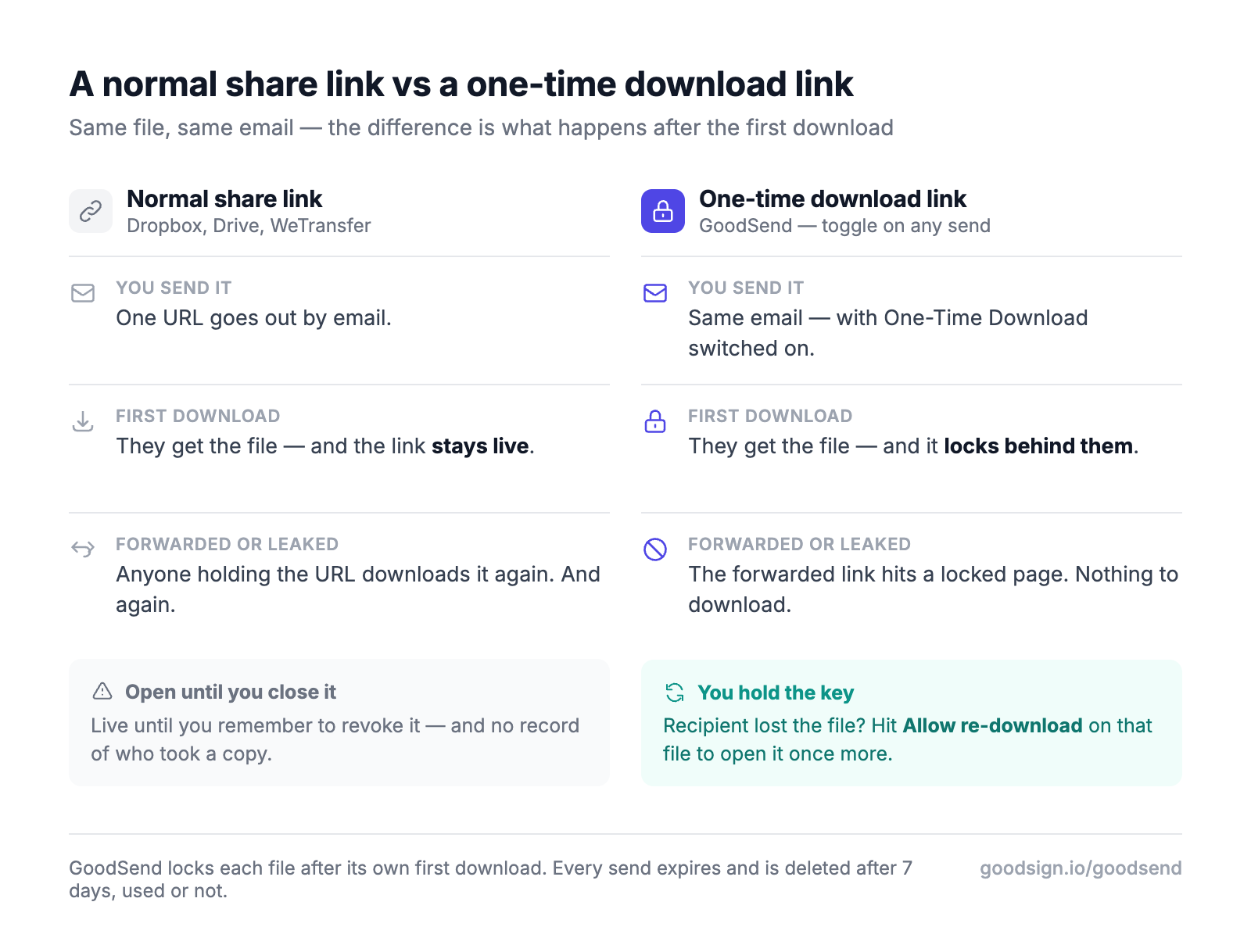
Think of it as the difference between pinning your document to a noticeboard and handing over a sealed envelope: once a one-time link is used, there is nothing left for anyone else to open. That's why they're the standard choice for contracts, payroll, medical records, credentials and anything else you'd rather not have circulating in an inbox thread.
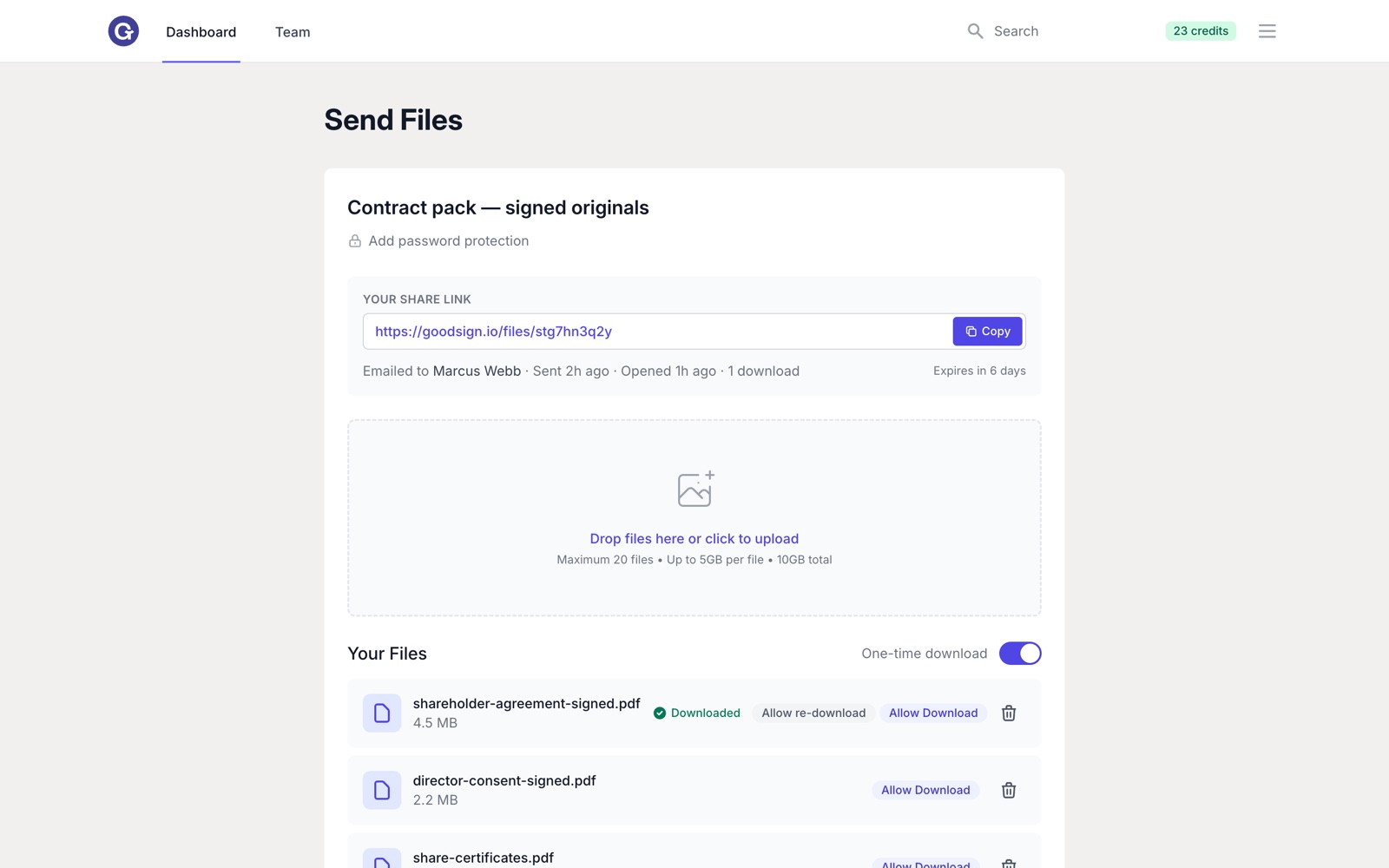
Step by step
With GoodSend it takes under a minute from upload to a link that self-destructs after one download. No software to install, nothing for your recipient to sign up for.
Drag and drop up to 20 files (10GB total, up to 1GB each) into GoodSend. Any file type works — PDFs, ZIPs, images, video, project files, and there's no need to zip them first.
Enter their name and email. The link is delivered straight to their inbox, so it reaches the right person — not a URL floating around in a group chat.
In the sending options, enable the One-Time Download toggle. Want a second layer? Add a password and share it through a different channel.
One send costs one credit ($1.50) — no subscription, no monthly fee. Every transfer is 256-bit encrypted in transit and at rest.
Your dashboard shows delivered → opened → downloaded with exact timestamps. The moment a file is downloaded it locks — and only you can open it again.
The lock is per file, and it's reversible by you — never by whoever holds the link. If a download fails halfway or your recipient loses the file, open the send and hit Allow re-download on that one file. It opens for a single further download, and it doesn't cost another credit.
Your options
Most mainstream file-sharing tools don't actually offer single-use links — their links stay live for anyone holding the URL. Here's the honest landscape.
| Method | One-time (single-use) option? | If the link is forwarded | Download tracking | Cost shape |
|---|---|---|---|---|
| GoodSend | Yes — built-in toggle on every send | Locked after the first download; only you can reopen it | Delivered / opened / downloaded, timestamped | $1.50 per send, no subscription |
| WeTransfer | No — not on any plan | Keeps working for anyone until it expires | Varies by plan | Free plan with caps, otherwise subscription |
| Dropbox / Google Drive links | No — standard share links are reusable | Keeps working until you revoke it manually | Limited | Included with storage plans |
| DIY (self-hosted / presigned URLs) | Possible — if you build and maintain it | Depends on your implementation | Only what you build | Your development time |
Capabilities as published July 2026. We've made our best effort to research each tool; it's possible we've missed something or got something wrong. Comparing costs for regular sending? See our WeTransfer pricing breakdown.
The other side
No account, no app, no friction — the security is invisible to them and visible to you.
The email lands
They get a clean email with a secure download button. You see Delivered in your tracking.
They click and download
The file downloads straight in the browser. You see Opened, then Downloaded — with exact timestamps.
The file locks
The instant the download completes, the file locks. Anyone who tries the link again — including a forwarded copy — sees it's already been used. Only you can reopen it.
The files are erased
Used or not, everything is permanently deleted from our servers after 7 days. Nothing sits around waiting to leak.
Trusted by businesses worldwide
Questions
It's a URL that self-destructs after its first use. The recipient clicks, downloads the file, and the link permanently deactivates — anyone who opens it afterwards sees a notice that it's already been used. That makes it the safest way to deliver a file to exactly one person: a forwarded, leaked or intercepted copy of the link is worthless once the download has happened.
Yes — one-time download link, single-use download link and self-destructing download link all describe the same thing: a URL that stops working after the first download. Different tools just use different names for the same security feature.
No. The link deactivates the moment the first download completes. If the email is forwarded or the URL leaks afterwards, anyone clicking it sees the link is no longer active. Until that first download, the transfer is protected by 256-bit encryption — and you can add a password as a second layer, shared through a separate channel.
You can reopen it for them. Open the send, find the file marked Downloaded and hit Allow re-download — it unlocks for one more download at no extra cost, and only the account that sent it can do that. Your tracking also shows the exact time the first download happened, so you can confirm they really did receive it. Expecting repeat downloads from the start? Leave the one-time toggle off and the link works for its full 7-day life instead.
An expiring (temporary) link is time-based: it dies after a set period no matter how many downloads happen. A one-time link is usage-based: it dies after the first download, however soon that is. GoodSend one-time links give you both at once — a single download, plus automatic expiry after 7 days if the link is never used, after which the files are permanently deleted.
Yes. One GoodSend send covers up to 20 files and 10GB total (up to 1GB per file) behind a single secure one-time link, for one credit. Any file type is supported, and your recipient downloads in the browser — no account, no app.
$1.50 per send with GoodSend — no subscription, no monthly fee. Credits come in packs of 10, never expire, and the same credits also cover GoodSign document e-signing. You pay only when you actually send something.
Up to 20 files and 10GB per send — encrypted, tracked, and dead after the first download — for $1.50. No subscription, nothing for your recipient to install.
No credit card to sign up. Credits never expire — and the same credits cover document signing too.
All-in-one for time, projects, invoices, quotes & expenses.
Try HeyGopher free →
All rights reserved © GoodSign Limited 2026
2 Stuart St, Ponsonby, Auckland 1011, New Zealand..